Last Updated: November 6, 2026
Quick Summary
A smart lock prevents home lockouts by removing the physical key, letting you open the door with a code, phone, or fingerprint instead. You can still be locked out by a dead battery, dead phone, or forgotten code, so set up backup access and test it before you need it.
- Most smart locks fit doors between 1-3/8 and 1-3/4 inches thick and reuse the existing door hole.
- A keypad works without a phone, Wi-Fi, or app, so it survives the most failure scenarios.
- Test every entry method at least three times, including from outside with the door closed.
- Keep the physical key override off-site and have your backup actually open the door once.
- Give each household member a personal code so you can revoke one person without disrupting others.
Table of Contents
- How Smart Locks Reduce Key-Related Lockouts
- Smart Lock Compatibility With Existing Deadbolt
- Choosing Your Keyless Entry Method
- Step-by-Step Setup and Testing Procedure
- Smart Lock Backup Access Options That Actually Work
- Smart Lock Battery Failure: What Happens and How to Prepare
- Smart Lock Security and Hacking Risks
- Failure-Mode Checklist for Every Lockout Scenario
- Planning Access for Every Person in the Household
- Booking a Smart Lock Installation or Lockout Backup Plan
- Frequently Asked Questions
How Smart Locks Reduce Key-Related Lockouts
Preventing home lockouts with smart lock technology works by removing the one thing that causes most lockouts: the physical key. A smart lock lets you open your door with a code, a phone, or a fingerprint, so there is no key to lose, forget inside, or leave behind.
That single change matters more than most people expect. Someone steps out to grab the mail, the door clicks shut, and the key is left on the kitchen counter. A keyless entry lock removes that scenario entirely.
Here is the honest version, though. A smart lock trades one failure mode for others. You will not lose a key you never carry. You can still get locked out by a dead battery, a dead phone, or a forgotten code.
Below, we break down exactly how to close every one of those gaps.
Smart Lock Compatibility With Existing Deadbolt
Most smart locks replace the deadbolt’s interior and exterior hardware while reusing the existing door hole, so compatibility usually comes down to four measurements. Check these before you buy anything:
- Door thickness: most locks fit doors between 1-3/8 and 1-3/4 inches thick
- Backset: the distance from the door edge to the center of the hole, either 2-3/8 or 2-3/4 inches
- Cross bore: the size of the main hole, typically 2-1/8 inches
- Door material and alignment: wood and metal doors both work, but a warped or misaligned door causes jammed bolts
The measurement that trips people up is backset. A lock built for one backset will not bolt onto a door drilled for the other without an adapter.
Door alignment deserves its own warning. A deadbolt that drags now will drag worse once a motor drives it. Watch out: a misaligned strike plate burns through battery life fast and can leave the bolt half-thrown, which is a security problem, not just an annoyance.
Choosing Your Keyless Entry Method
The right entry method depends on who uses the door and how often. There is no single best option, and most households end up mixing two.
| Method | Best For | Main Weakness |
|---|---|---|
| Keypad code | Family, renters, service workers | Codes get shared and forgotten |
| Smartphone app | Remote access, checking lock status | Depends on phone battery and signal |
| Fingerprint | Fast everyday entry | Fails on wet or worn fingers |
| Key fob or card | Kids, elderly users, staff | Easy to lose, like a key |
Keypads are the workhorse. They work without a phone, without Wi-Fi, and without an app. If you want one method that survives the most failure scenarios, pick a keypad.
Mobile app control adds remote locking and lock status checks. That is genuinely useful when you are unsure whether you locked up. It is also the most fragile method, because it depends on your phone, your network, and the app maker’s servers.
Fingerprint access is the fastest option for daily use. It is a poor choice as your only method, since cold, wet, or damaged fingers can fail a read.
Step-by-Step Setup and Testing Procedure
A smart lock is only as reliable as its installation. Follow this sequence and test every step before you rely on it.
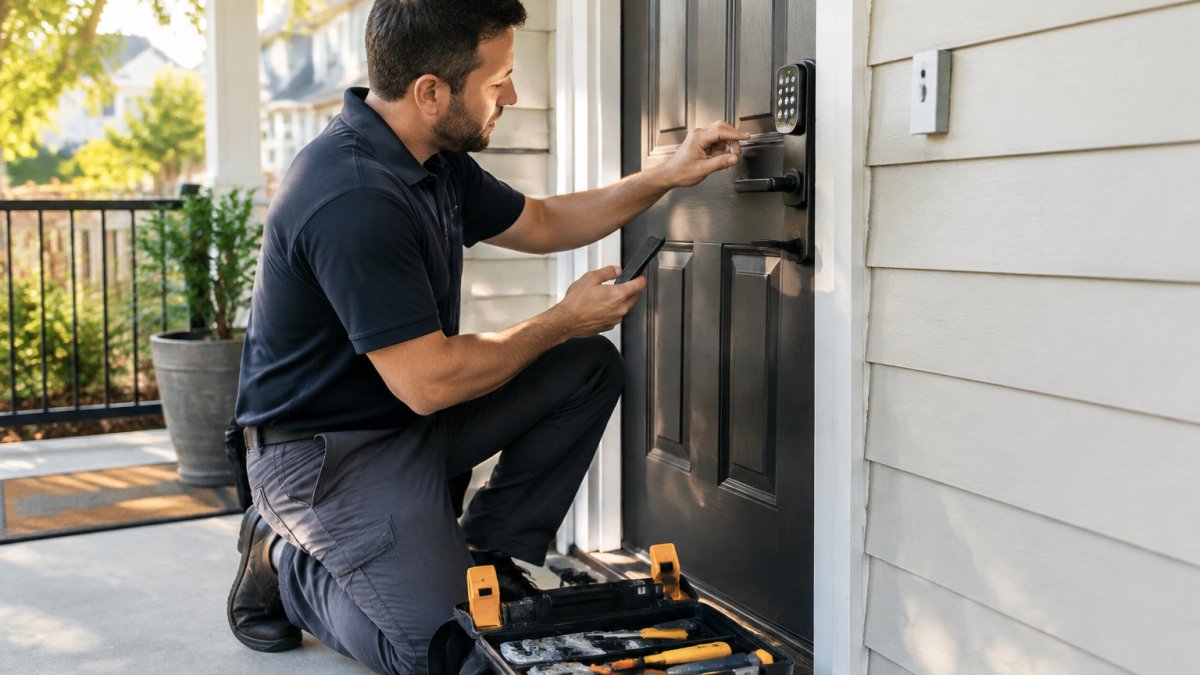
- Remove the old deadbolt and check the door hole and backset against the new lock’s spec sheet.
- Mount the exterior keypad or reader, feeding the cable through the door if the model requires it.
- Install the interior assembly and hand-tighten the mounting screws. Over-tightening warps the plate and binds the bolt.
- Check bolt travel with the door open. The bolt should slide fully without dragging.
- Pair the lock with the app and your home network, then set the master code.
- Add user codes and fingerprints for each person in the household.
- Test every method at least three times: keypad, app, fingerprint, and the physical key override.
- Test from outside with the door closed, which is the only test that counts.
If you would rather not handle the wiring and alignment yourself, it helps to know how long a lock installation takes before you schedule anything.
Expected result: every entry method works on the first try, and the bolt seats fully with a firm push.
Smart Lock Backup Access Options That Actually Work
The best smart lock backup access options are the ones that do not depend on the same thing that just failed. A phone-based backup for a phone-based lock is not a backup.
Build at least two layers:
- A physical key override. Most smart locks ship with a key cylinder. Keep that key somewhere off-site, not in the flowerpot.
- A spare key with a trusted neighbor or family member. Old-fashioned, and still the most reliable fallback.
- A temporary passcode for a guest or a sitter, deleted when they leave.
- The manufacturer’s app on a second household member’s phone, so one dead phone is not a lockout.
What most guides miss is that backup access only works if you have tested it. Hand a neighbor the override key, then have them actually open your door once. A key that has never turned is not a backup plan.
Smart Lock Battery Failure: What Happens and How to Prepare
When a smart lock battery dies, the failure is rarely instant. Most residential locks stage the decline so you get a warning window, and knowing that sequence is what turns a dead battery from a lockout into a maintenance task.
The typical failure sequence:
- Low-battery alert. The lock chirps at unlock, flashes a light, or pushes an app notification. Some models also announce a percentage in the app.
- Reduced motor torque. The bolt may still throw but sound slower or need a second attempt. This is the stage people ignore.
- Keypad and app go dark. On nearly every battery-powered residential smart lock, the electronics share the same cells as the motor, so when the cells fade, code and app entry stop together.
- Physical key override only. The key cylinder is mechanical and does not depend on the battery, which is why the override key is the true last line of defense.
A few lock types behave differently. Some models keep a keypad alive on a separate coin cell after the motor battery dies, and a small number offer a temporary external power terminal (often a micro-USB or USB-C port) so you can jump the lock from a portable battery pack long enough to enter a code. Check your model’s manual before you need it, because that port is useless if you do not know it exists.
Preparation that actually holds up:
- Replace on a schedule, not a whim. Most locks run several months to a year per set, depending on traffic and motor strain. Put a recurring reminder in your phone for the month the manufacturer recommends, then replace whether or not the alert fired.
- Use the specified battery type. Rechargeable cells often run at a lower nominal voltage and trigger false low-battery warnings or premature shutdown.
- Keep a spare set in the house and know where the override key lives. A spare battery you cannot find is not a spare.
- Watch bolt drag. A bolt that rubs the strike plate draws more current on every throw and drains cells faster than anything else. Fix the alignment before you blame the battery.
If the lock is already dead and you are outside:
- Use the physical key override first. It is the fastest path and does not require power.
- If the model has an external power terminal, connect a portable battery and enter your code.
- If neither works, call a locksmith rather than forcing the bolt. Prying a deadbolt damages the door and frame and usually costs more than the service call.
A lock that dies with no warning and no override key on hand is a job for a licensed locksmith. Do not drill or pry a residential deadbolt yourself, as that can damage the door and frame.
Measurable checks to run monthly:
- Open the app and confirm the reported battery level is above the manufacturer’s replacement threshold.
- Throw the bolt by keypad once and listen for the motor. A slower or louder throw is an early warning.
- Confirm the override key still turns smoothly in the cylinder. A key that has never been used can be stiff from factory lubricant.
That last check matters more than it sounds. A key that has never turned is not a backup plan, and a battery alert you never enabled is not a warning.
Smart Lock Security and Hacking Risks
Harden yours with four steps:
- Turn on two-factor authentication for the lock’s account.
- Use a unique password, not one you reuse elsewhere.
- Delete old codes when a roommate moves out or a contractor finishes.
- Install firmware updates when they appear.
Encryption protects the signal between your phone and the lock. It does not protect a code you gave to six people. If you live in an apartment or shared building, the account and code habits matter more than the hardware. For a closer look at that question, read whether smart locks are safe for apartments.
Failure-Mode Checklist for Every Lockout Scenario
Run this list once when you set the lock up, then again every few months. It covers the failures that actually cause lockouts.
- Dead battery: spare batteries at home, override key stored off-site, low-battery alert enabled
- Lost or dead phone: second household member has app access, plus a working keypad code
- App or server outage: keypad code and physical key both tested
- Wi-Fi or Bluetooth failure: lock still opens by keypad and key without a network
- Forgotten code: master code stored somewhere secure outside the home
- Power failure: confirm the lock runs on batteries, not house power
- Guest code left active: review the user list monthly
- Door misalignment: check bolt travel each season
The pattern is clear. Every failure has a workaround, as long as you set the workaround up before you need it.
Planning Access for Every Person in the Household
Access planning is where smart locks beat keys outright, and where most setups go wrong. A single shared code for the whole house defeats the purpose, because you cannot tell who used it and you cannot revoke one person without disrupting everyone.
The workable approach is one credential per person, chosen to fit how that person actually uses the door. This is the household-specific planning most guides skip.
Match the credential to the person:
- Adults: a personal keypad code plus app access. Give each adult their own code so the app log shows who unlocked and when.
- Kids: a short, memorable code, and check the lock’s auto-lock and child-safety settings. Some models let you disable interior manual thumb-turn locking, which matters if a child could lock themselves in or out.
- Older adults: fingerprint or keypad, whichever is easier on the hands. A keypad with large, backlit buttons and audible feedback helps more than a fingerprint reader for someone with limited dexterity or vision.
- People with limited dexterity or grip strength: avoid small key fobs and stiff thumb-turns. A keypad code or a fingerprint reader that does not require pinching is usually easier. Check whether the lock offers a one-touch lock button rather than a twist.
- Renters: a code you can delete the day the lease ends, with no re-keying. Confirm the lease allows a smart lock before you install one.
- Guests and sitters: temporary passcodes with an expiry date, set to the hour if the app supports it.
- Service workers: a one-time code, deleted the same day the work is done.
Design the codes so they survive real life:
- Avoid birthdays, house numbers, and repeated digits. Those are the first codes a curious neighbor or a former roommate tries.
- Keep one master or admin code that only the primary account holder knows, and store it somewhere secure outside the home, such as a password manager.
- Do not reuse a code across households. A code shared with a sitter who works for two families is a code you no longer control.
Build in a review cadence:
- Monthly: open the user list and confirm every active code belongs to someone who should still have access.
- After any move-out, breakup, or contractor visit: delete the credential the same day, not the same week.
- Seasonally: test each person’s credential once, especially fingerprints, which can drift as fingers change with weather or age.
Watch out: a fingerprint enrolled in summer can fail in winter when skin is dry or cracked. Enroll the same finger twice, or pair the fingerprint with a keypad code as a fallback for that person.
Accessibility details worth checking before you buy:
- Backlit keypad with tactile or audible feedback for low-vision users.
- A fingerprint reader positioned at a comfortable height, not tucked under the handle.
- App text size and contrast settings, since many lock apps are hard to read for older users.
- Whether the lock can be operated one-handed, which matters for anyone using a cane, walker, or stroller.
Individual credentials mean you always know who came in, and you can revoke one person without disrupting anyone else. That is a level of control a physical key simply cannot match, and it is the part of smart-lock ownership that pays off every day, not just during a lockout.
For lockout prevention beyond the door hardware, these tips for preventing home lockouts cover the habits that matter.
Booking a Smart Lock Installation or Lockout Backup Plan
Even the best smart lock needs a solid install and a real backup plan. That is where we come in.
BDS Locksmith is a licensed, bonded, and insured mobile locksmith serving the South Bay Area. We provide mobile locksmith services on-site for residential and automotive needs.
Not sure who to hire? Our guide on choosing a locksmith for lock installation walks through the questions to ask. If you want to know what a fallback call costs before you ever need one, see our breakdown of residential lockout service pricing.
Frequently Asked Questions
Can a smart lock prevent you from getting locked out of your home?
A smart lock removes the most common cause of lockouts, which is a lost or forgotten physical key, because you can open the door with a code, fingerprint, or phone. It does not eliminate every scenario. A dead battery, a lost phone, or a Wi-Fi outage can still leave you stuck if you have no backup. The practical approach is to pair the smart lock with at least two independent backup access options, such as a keypad code and a spare key held by a trusted neighbor, so no single failure locks you out.
What happens to a smart lock when the power goes out?
Most residential smart locks run on internal batteries, not household wiring, so a power outage does not affect them at all. The lock keeps working on its battery reserve. The part that fails during an outage is your home Wi-Fi, which means remote access through an app may not work until the router comes back online. Local access methods, including the keypad, fingerprint reader, and physical key override, continue to function. Check that your lock stores codes locally rather than relying on the cloud.
How can you tell if a smart lock is compatible with your door?
Measure your door’s backset, which is the distance from the edge of the door to the center of the deadbolt hole, and confirm whether it is 2-3/8 inches or 2-3/4 inches. Check the door thickness, since most smart locks support 1-3/8 to 1-3/4 inches. Look at the existing deadbolt’s bore hole diameter, typically 2-1/8 inches. Confirm the door material and whether a deadbolt already exists. Retrofits that fit over an existing deadbolt are the simplest option for renters and older doors.
What backup options should you have if a smart lock stops working?
Plan for at least three independent access routes. First, a keypad code that works offline without the app. Second, a physical key override, either on the lock itself or a spare kept with a trusted neighbor. Third, a low-battery warning routine so you replace batteries before they die. For households with renters or guests, set a temporary passcode that you can revoke. If the lock fails completely, a licensed locksmith can open the door without damage and re-key or replace the hardware the same day.
A smart lock removes the most common cause of lockouts, but only if the backup layers are in place before something fails. If you want the hardware installed right and a tested backup plan behind it, call BDS Locksmith at (408) 300-4369. We offer free estimates, same-day service, and a 5% military discount. Get started with BDS Locksmith and lock your door with confidence, not crossed fingers.