Table of Contents
- Step 1: Check and Replace the Key Fob Battery
- Step 2: Inspect Battery Contacts for Corrosion or Damage
- Step 3: Clean the Buttons and Internal Contacts
- Step 4: Check for Stuck, Worn, or Damaged Buttons
- Step 5: Test Your Spare Key Fob
- Car Key Fob Not Working After Battery Replacement
- Step 6: How to Start a Car With a Dead Key Fob
- Step 7: Car Key Fob Reprogramming
- Step 8: Determine If Your Fob or Vehicle Is at Fault
- When to Call a Professional Locksmith
- Frequently Asked Questions
Last Updated: October 13, 2026
Step 1: Check and Replace the Key Fob Battery
The most common reason your car key fob stops working is a dead battery. A coin-cell battery powers your fob, and these batteries typically last 3-4 years depending on how often you use the remote.
Identify your battery type and orientation
Your fob uses one of two common battery types: CR2025 or CR2032. Both are small, flat, coin-shaped batteries you can find at any drugstore or hardware store.
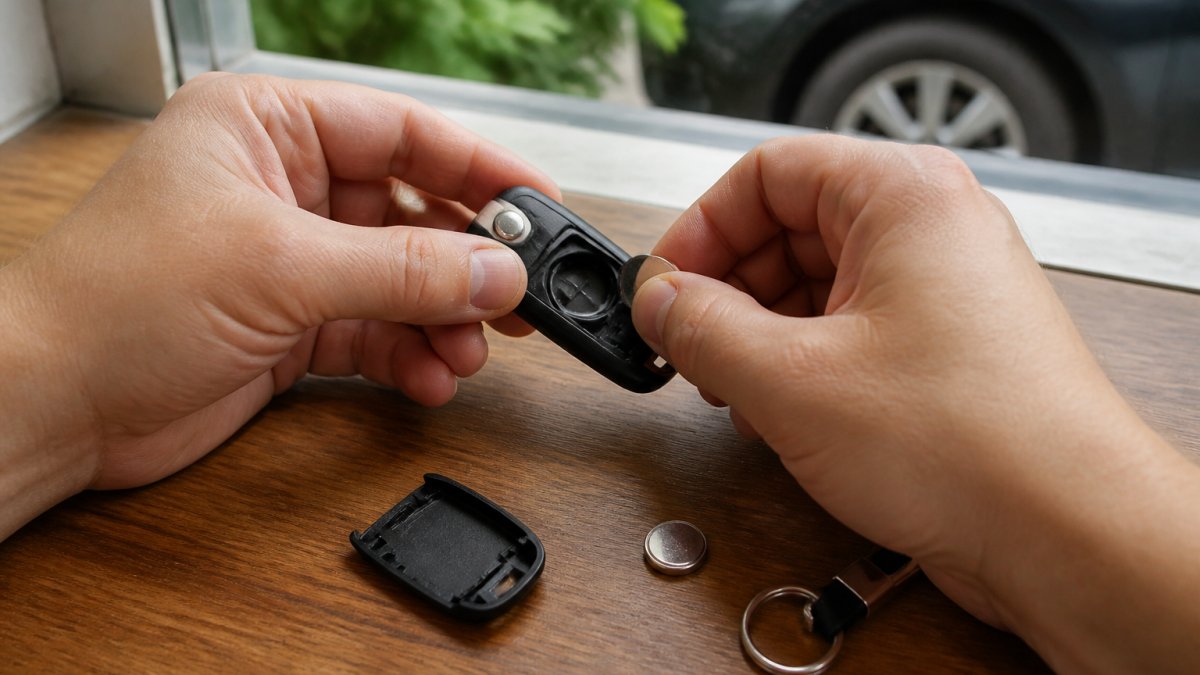
Check your fob’s manual or look inside the battery compartment to identify which type you need. The battery sits in a small metal holder. Note which side faces up, this matters. The positive side (marked with a +) should face toward you when you look at the battery compartment.
Install the new battery correctly
Pop open your fob with a coin or small flathead screwdriver. Insert the new battery with the positive side facing up. Press it firmly into place until it clicks.
Close the fob and test it immediately. Point it at your car and press a button. If the lights flash or the door locks, you’ve solved the problem.
Step 2: Inspect Battery Contacts for Corrosion or Damage
If a new battery didn’t fix your car key fob not working, check the metal contacts inside the fob. These small metal pieces connect the battery to the circuit board.
Look for white, blue, or green buildup on the contacts. That’s corrosion. It blocks the electrical connection, so your fob won’t function even with a fresh battery.
Gently rub the contacts with a pencil eraser or a dry cloth. Use light pressure, you’re cleaning, not scrubbing. Wipe away any debris.
Also check the battery compartment itself. If you see corrosion there, clean it the same way. Let everything dry completely before installing a new battery.
Step 3: Clean the Buttons and Internal Contacts
Dirt and grime on the rubber buttons prevent them from making proper contact with the circuit board underneath. This is why your key fob might work intermittently or not at all.
Remove the battery first. Use a cotton swab slightly dampened with rubbing alcohol. Clean around the edges of each button. Get into the seams where dust collects.
Let the alcohol dry for a minute. Then clean the rubber pad that sits under the buttons. This pad has conductive material on the bottom that touches the circuit board. Wipe it gently.
Reassemble everything and test. Many fobs start working again after this simple cleaning.
Step 4: Check for Stuck, Worn, or Damaged Buttons
Press each button on your fob slowly. They should click and spring back smoothly. If a button feels stuck, sticks partway, or doesn’t click, that’s your problem.
Stuck buttons often happen from spilled liquid, dirt buildup, or wear over time. Try the cleaning steps above first. If the button still sticks after cleaning, it may need professional repair.
Worn buttons feel mushy instead of clicky. They may still work, but they’re failing. Damage shows as cracks, missing pieces, or buttons that don’t move at all.
At this point, you have two options: try a spare fob if you have one, or call a professional locksmith.
Step 5: Test Your Spare Key Fob
If your car came with a spare fob, use it now. Press the buttons and see if it works.
A working spare tells you the problem is with your main fob, not your car’s receiver. You can then focus on repairing or replacing just the fob.
If the spare doesn’t work either, the issue is likely with your vehicle’s receiver system. That’s more complex and requires professional help.
Car Key Fob Not Working After Battery Replacement
You replaced the battery, but your car key fob still isn’t working. This happens more often than you’d think, and there are specific reasons why.
First, confirm you installed the battery correctly. The positive side must face up. Flip the battery and try again if you’re unsure. Many people install it backwards the first time.
Second, check that you bought the right battery type. CR2025 and CR2032 look similar but are different thicknesses. Using the wrong one won’t make good contact.
Third, your fob may need reprogramming. Some vehicles require you to reprogram the fob after changing the battery. See Step 7 for details.
If none of these work, the circuit board inside your fob may be damaged. Water damage, physical drops, or age can harm the board. Professional repair or replacement is your next step.
Step 6: How to Start a Car With a Dead Key Fob
Your fob is dead, but you still need to drive. Every push-button-start vehicle sold in the United States is required to have a backup start method that works with a dead fob battery, the trick is knowing where your vehicle hides it. The steps below walk through access first, then starting.
Use the hidden mechanical key
Most modern fobs contain a physical key hidden inside. Press or slide the small release button or tab near the fob’s edge, then pull the key out. On some fobs the key is released by prying off a small cover with a coin.
Use this key to unlock the driver’s door manually. The keyhole is often hidden behind a small plastic cap on the door handle, look for a slot at the bottom edge of the cap where a key or flat tool can pry it off. Once inside, the same key can usually be inserted into a slot or covered keyhole on the steering column or center console to satisfy the ignition interlock.
Find your vehicle’s backup start location
With push-button start, the vehicle needs to detect the fob’s transponder chip even when the fob’s battery is dead. Manufacturers solve this by placing a low-frequency antenna in a specific spot that can read the chip at close range. The location varies by make and model, but it almost always falls into one of these patterns:
- Center console or cupholder area, common on many Toyota, Lexus, Honda, and Acura models. Look for a key-shaped icon molded into the plastic.
- Steering column shroud, common on many Ford, Lincoln, Chevrolet, Buick, and GMC models. Hold the fob against the shroud near the start button.
- Start/stop button itself, on many Nissan, Infiniti, Hyundai, Kia, BMW, and Mercedes-Benz models, pressing the fob directly against the start button while pressing the brake is the documented procedure.
- Glovebox or armrest compartment, some vehicles (notably certain Audi and Volkswagen models) have a dedicated key-reader slot inside a covered compartment.
Look for a small icon of a key with radio waves, a key silhouette, or a molded recess sized to hold a fob. That marking is your target.
The general sequence
- Sit in the driver’s seat with the mechanical key removed from the fob.
- Place the fob against the backup detection point (or insert the mechanical key into the ignition slot if your vehicle has one).
- Press the brake pedal firmly.
- Press the start/stop button while holding the fob in place.
- If the engine doesn’t start on the first try, hold the fob against the button for a full 3-5 seconds before releasing.
On some vehicles you must first press the start button once without the brake to enter accessory mode, then press the brake and press start again.
If the backup start doesn’t work
A failed backup start usually means one of three things: the fob’s transponder chip is damaged, the vehicle’s low-frequency antenna is faulty, or the vehicle battery itself is too weak to crank. Try jump-starting the vehicle first, a weak 12-volt battery is a common reason a push-button car won’t start even when the fob is fine. If the vehicle cranks but won’t run, the immobilizer may have lost its pairing with the fob, which requires reprogramming.
Photograph the backup start location page in your owner’s manual and save it to your phone. When you actually need it, you may be standing in a parking lot in the rain, not sitting at your kitchen table.
Finding the procedure for your specific vehicle
If your manual is lost, most manufacturers publish owner’s manuals as free PDFs on their owner-support websites. Search for your model year and “owner’s manual PDF,” then look in the index under “smart key,” “intelligent access,” “push-button start,” or “starting the engine, emergency.” You can also call a dealership service department and ask them to describe the backup start location for your VIN, they can look it up in seconds.
Step 7: Car Key Fob Reprogramming
Some vehicles require you to reprogram your fob after replacing the battery or if it loses its signal. Reprogramming resets the connection between your fob and your car’s receiver.
The process varies by manufacturer. Most involve a sequence of steps using the ignition and buttons on the fob. Common steps include:
- Turn the ignition on and off several times in quick succession
- Listen for a chime that signals programming mode
- Press buttons on the fob to register it
- Turn the ignition off to exit programming mode
Consult your owner’s manual for your specific vehicle’s reprogramming steps. If your manual is lost, search online for “[Your Vehicle Make and Year] key fob reprogramming.”
If reprogramming doesn’t work, your fob may have lost its receiver chip or the car’s receiver may be damaged. Professional service is needed at this point.
Step 8: Determine If Your Fob or Vehicle Is at Fault
By this point you’ve replaced the battery, cleaned the contacts, and tried the spare. If the problem persists, the next move is to stop guessing and diagnose by symptom. The table and decision path below will tell you which subsystem is most likely at fault, the fob, the vehicle’s receiver, radio interference, or the immobilizer, so you can choose the cheapest correct next step instead of paying for the wrong repair.
Start with the spare-fob test
If you have a spare fob, this single test splits the problem in half:
- Spare works, main fob doesn’t → the fault is in the main fob (battery, contacts, buttons, or internal board). Repair or replace the fob only.
- Neither fob works → the fault is in the vehicle (receiver, antenna, body control module, or vehicle battery) or in the environment (radio interference).
- Both fobs work but only at close range → the fob batteries are weak, or the vehicle’s receiver antenna is degraded.
If you don’t have a spare, borrow a fob from someone with the same make, model, and generation of vehicle. A borrowed fob that works on your car confirms your fob is the problem; one that doesn’t work points to your vehicle.
Match your symptom to the likely cause
| Symptom | Most likely cause | Confirm it by |
|---|---|---|
| Fob does nothing, no LED lights up | Dead fob battery | Replace with correct CR2025 or CR2032 |
| Fob LED lights up but car doesn’t respond | Fob signal not reaching receiver, or receiver fault | Try the spare; move away from buildings and other cars |
| Works sometimes, fails in certain locations | Radio-frequency interference | Test in an open parking lot away from cell towers, Wi-Fi, and storefronts |
| Works only when held against the car | Weak fob battery or degraded receiver antenna | New battery first, then test range |
| Car cranks but won’t run; security light stays on | Immobilizer lost pairing with fob | Reprogram or resynchronize the fob |
| Dashboard shows “Key not detected” or “No key” | Fob not detected by the vehicle’s low-frequency antenna | Try the backup start location from Step 6 |
| Interior lights dim, slow crank, or no crank | Vehicle 12-volt battery is weak | Test the vehicle battery with a multimeter or at an auto parts store |
| Both fobs and a borrowed fob fail | Vehicle receiver, antenna, or body control module fault | Professional diagnostic scan |
Rule out radio-frequency interference
Before assuming a hardware fault, rule out interference. Key fobs in the United States typically transmit on 315 MHz or 433 MHz. Strong nearby signals on or near those bands, cell towers, Wi-Fi routers, LED billboards, some store security gates, and even a phone or laptop sitting on top of the fob, can drown out the fob’s low-power signal.
Test by walking the fob 20-30 feet away from the vehicle, away from buildings and other parked cars, and pressing the button. If it works from a distance in the open but fails in one specific spot, interference is the cause, not a broken fob.
Rule out the vehicle battery
A weak 12-volt vehicle battery can cause symptoms that look like a fob problem: the receiver may not power up reliably, the immobilizer may not read the fob, and the push-button start may not engage. If your interior lights are dim, the engine cranks slowly, or you’ve recently left a light on, test the vehicle battery before spending money on fob repair. Most auto parts stores will test a battery for free.
When the answer is “both”
It’s possible for the fob and the vehicle to have independent problems at the same time, for example, a fob with a dead battery and a vehicle with a weak 12-volt battery. If a fresh fob battery and a charged vehicle battery still don’t solve it, the fault is almost certainly in the receiver, antenna, or immobilizer, and a professional diagnostic scan is the fastest way to identify it.
Work the diagnosis in this order: fresh fob battery → spare fob → open-area interference test → vehicle battery test → professional scan. Each step eliminates a whole category of causes, so you never pay for a repair you didn’t need.
What each outcome means for your next step
- Fob at fault → replace the fob or have it repaired and programmed. This is the least expensive outcome.
- Vehicle receiver or antenna at fault → requires a diagnostic scan and likely a dealer or qualified locksmith with manufacturer-level programming equipment.
- Immobilizer at fault → reprogramming or resynchronization, sometimes with a security code from the manufacturer.
- Vehicle battery at fault → replace or recharge the battery; the fob was never the problem.
When to Call a Professional Locksmith
Benjamin, the owner and operator, has helped thousands of Bay Area natives get out of tough situations regarding their lockouts. Some problems require professional expertise and equipment.
Call a locksmith when:
- Your fob won’t work after battery replacement and reprogramming attempts
- Both your main and spare fobs are unresponsive
- Your car won’t recognize any fob, even borrowed ones
- You need a new fob programmed to your vehicle
- Your ignition receiver or electrical system may be damaged
A professional locksmith can test your fob and vehicle separately. We diagnose whether the problem is the remote itself or your car’s receiver. We also program replacement fobs correctly, saving you a trip to the dealership.
BDS Locksmith offers same-day mobile service throughout the South Bay Area. We provide free estimates before any work begins, so you know costs upfront. Our licensed, bonded, and insured technicians handle automotive key issues safely and efficiently.
If you’re locked out or need immediate help, call us at (408) 300-4369. We respond to emergency lockouts 24/7.
| Problem | Likely Cause | First Step |
|---|---|---|
| Fob not responding at all | Dead battery | Replace with new CR2025 or CR2032 |
| Fob works intermittently | Dirty contacts or stuck button | Clean battery contacts and buttons |
| New battery didn’t help | Wrong battery type or reversed polarity | Verify correct battery and reinstall correctly |
| Both fobs unresponsive | Vehicle receiver issue | Test a borrowed fob from same vehicle model |
| Can’t access vehicle | Dead fob battery | Use hidden mechanical key to unlock |
| Fob stops working after water exposure | Water damage to circuit board | Contact professional locksmith for replacement |
A dead car key fob doesn’t mean you’re stranded. Start with the battery, it solves most problems in minutes. If that doesn’t work, move through the cleaning and testing steps methodically. You’ll either fix it yourself or gather enough information to explain the problem clearly to a professional.
When you’re ready for expert help, BDS Locksmith handles key fob replacement, reprogramming, and vehicle access issues. We come to you with the right equipment and experience. Call (408) 300-4369 for fast, reliable service.
Keep your spare fob in a safe place at home, not in your car. When your main fob fails, you’ll have a working backup to test with and use while repairs happen.
Frequently Asked Questions
What should I do first if my car key fob stops working?
Start by replacing the battery with a fresh coin-cell battery (typically CR2025 or CR2032). Most non-functioning fobs are caused by a dead or dying battery. If a new battery doesn’t restore operation, check the battery contacts for corrosion, clean the button contacts, and test your spare fob to narrow down whether the problem is the fob itself or your vehicle’s receiver.
Why is my car key fob not working after I replaced the battery?
If your fob still doesn’t work after battery replacement, the battery contacts may be corroded or the internal circuitry may be damaged. Clean the contacts with a dry cloth or isopropyl alcohol. If cleaning doesn’t help, reprogramming may be required. If reprogramming fails, the fob’s receiver or immobilizer may need professional service.
How do I unlock and start my car with a dead key fob?
Most modern fobs contain a hidden mechanical key, slide or pry open the fob casing to extract it and unlock your door manually. To start the car, place the fob near or against the push-button start button and press it, or insert the mechanical key into the ignition and turn it normally. If your vehicle has a backup key-detection feature, holding the fob near the start button may allow ignition even with a dead battery.
Can cold weather cause a key fob to stop working?
Yes, cold temperatures can temporarily reduce battery voltage and slow signal transmission, making your fob appear unresponsive. If your fob stops working in winter, try replacing the battery first, cold reduces battery performance. Keep your fob in a warm pocket or vehicle interior. If the fob works again once warmed up, battery replacement will likely solve the issue permanently.